
UC Irvine students rely on WebReg to search and enroll in courses each quarter. Despite being a mission-critical tool used by thousands of students, the interface had not been substantially updated in years and exhibited numerous usability failures that created problems during one of the most time-sensitive academic workflows: course registration.
The core issue was information overload at the point of entry: the WebReg input page presented all available filter fields simultaneously (approximately 15 input parameters) without any hierarchy. This violates the fundamental principles of cognitive load management and actively disadvantages its primary user base: first-time and less experienced students.
Target User Profile
Our research centered on a clearly defined user archetype: a UC Irvine undergraduate student who logs into the Schedule of Classes system during enrollment windows, often under time pressure, and finds the interface confusing, slow, and stressful to navigate. This user is neither a power user nor entirely a novice; they have basic digital literacy but lack familiarity with advanced academic registration systems.
Research Questions
How does the current input architecture contribute to cognitive overload for student users?
Which heuristic violations in the existing system cause the most significant usability failures?
What structural changes to the task flow would most reduce friction without sacrificing functionality for advanced users?
How can the redesign preserve UCI's institutional visual identity while adopting modern usability standards?
I served as a UX designer and researcher on this five-person team. My primary areas of ownership were the User Story definition and the Task Flow redesign, both of which served as the foundational research base for the deliverables (wireframes, mockups, prototype).
In addition to leading these components, I contributed to the expert review and heuristic analysis phase, co-developed wireframes, and collaborated on the high-fidelity Figma mockups and interactive prototype.
Specific Contributions
Led user story creation — defined the primary research persona and translated user pain points into a single, actionable design directive
Redesigned the end-to-end task flow — mapped the existing 5-step flow and proposed a streamlined 4-step redesign centered on progressive disclosure
Contributed to heuristic expert review — applied Shneiderman's Golden Rules, Norman's Principles, and Gestalt principles to audit the existing interface
Collaborated on wireframe-to-prototype translation — ensured that research findings were accurately reflected in the final interactive deliverable
The project employed a multi-method qualitative UX research approach, combining structured heuristic evaluation with user-centered design methods. The methodology was iterative: each phase informed the next, and findings were continuously integrated into the evolving design.
User Story Mapping
User story creation was the first and most foundational research step. Rather than attempting to capture all possible user needs, the team deliberately constrained the story to a single, high-priority scenario — a known best practice for maintaining design focus in time-bounded projects.
The resulting user story was:
"As a UC Irvine student, I want a simplified and visually clear way to search and compare class times so that I can easily build my schedule without feeling overwhelmed by cluttered input fields."
This story served three critical functions: it anchored all design decisions to a concrete user need, it established cognitive load reduction as the primary design goal, and it prevented scope creep by defining a single clear benefit condition.
A key methodological lesson emerged from this phase: early drafts of the story were overloaded with implementation detail, which diluted their utility as design anchors. Iterative refinement toward the standard 'As a [user], I want [goal], so that [benefit]' format significantly improved the story's actionability.
Task Flow Analysis
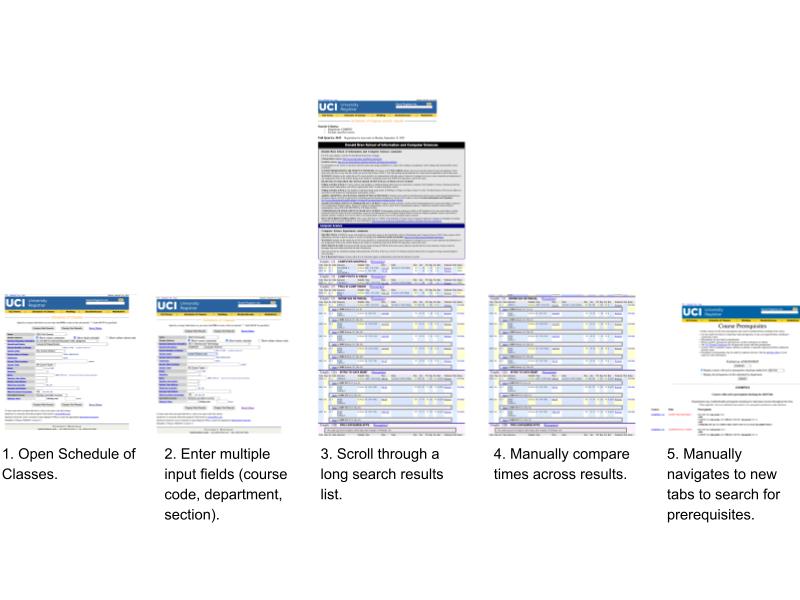
Task flow analysis was used to audit the existing user journey and identify specific friction points at each step. The team mapped the current WebReg workflow step-by-step, documenting both the required actions and the cognitive demands placed on the user at each stage.
Existing Task Flow (5 steps — High Friction)
Open Schedule of Classes
Enter multiple input fields simultaneously (course code, department, section, GE category, course level, instructor, etc.)
Scroll through a long, undifferentiated list of search results
Manually compare class times across results with no visual support
Navigate to separate tabs to look up prerequisites for courses of interest
This analysis revealed that the existing flow required users to hold multiple pieces of information in working memory simultaneously, navigate between disconnected pages, and make decisions without consolidated information. These are well-documented antecedents of user frustration and error.
Redesigned Task Flow (4 steps — Reduced Friction)
Open Schedule of Classes
Enter the course name or keyword in a single, prominent search bar
Optionally apply advanced filters (day/time, instructor, GE category) via a progressive disclosure mechanism
View consolidated results list displaying time, instructor, location, and prerequisites in a single view
The redesigned flow reduced mandatory interactions from 5 to 4, eliminated cross-page navigation for prerequisite lookup, and converted all filtering from mandatory upfront input to optional post-search refinement. This structural change directly addressed the primary usability failures identified in the expert review.
Expert Review & Heuristic Evaluation
The team conducted a structured expert review of the existing WebReg interface using three established usability frameworks: Shneiderman's Eight Golden Rules of Interface Design, Norman's Principles of Design, and Gestalt perceptual principles. This multi-framework approach allowed us to triangulate findings and identify issues with overlapping heuristic coverage.
Identified Usability Strengths
Consistency (Norman): Input fields are arranged in a coherent sequential block with adjacent modifier fields, creating a predictable spatial grammar
Proximity/Continuity (Gestalt): Filters are grouped in one continuous block on the input page; course results are visually grouped under course titles on the results page
Closure (Shneiderman): Successful queries produce a clear state transition to a separate results page; error states produce a dedicated error page — both provide meaningful feedback
Symmetry (Gestalt): The three action buttons (Display Web Results, Display Text Results, Reset Menu) are symmetrically placed, communicating their functional equivalence
WCAG-aligned labeling: Results page course listings use clear hierarchical headers to associate codes and sections with course titles
Identified Usability Failures: Severity ratings are based on Nielsen's 1-5 scale (1 = cosmetic, 5 = critical).
Poor Universal Usability (Shneiderman) — Severity 5/5: All 15+ filter fields are presented simultaneously with equal visual weight, providing no guidance for novice users about which fields are essential vs. optional. Advanced users may benefit, but the majority of students — who only need basic search — are overwhelmed before entering a single character.
Insufficient Error Prevention (Shneiderman) — Severity 3/5: The system provides no inline validation or dynamic feedback while the user is composing a query. Errors (e.g., missing required department field) are only surfaced after submission, forcing the user to restart. There is no affordance indicating which fields are required.
Low User Control (Shneiderman) — Severity 3/5: The mandatory upfront filter model removes agency from the user. Rather than entering what they know and refining from there, users must navigate a complex form before receiving any feedback. This inverts the expected mental model of search.
Weak Action Reversibility (Shneiderman) — Severity 2/5: Using the browser back button to modify a search retains all previous field values, which is helpful for minor adjustments but problematic when conducting an entirely new search. There is no 'clear all' or 'new search' affordance on the results page.
Lack of Input Constraints (Norman) — Severity 3/5: The system allows logically invalid query combinations (e.g., entering a course title keyword without specifying a department) without warning. The resulting error is non-informative and provides no corrective guidance.
Short-Term Memory Load for Prerequisites (Shneiderman) — Severity 3/5: To check prerequisites, users must navigate to a separate page listing prerequisites for all courses in a department, requiring them to remember the specific course code from the results page — a clear violation of recognition-over-recall principles.

I began by crafting a focused user story centered on student frustration and cognitive overload, which guided all design decisions. I then redesigned the task flow, reducing multiple scattered inputs into a single search bar supported by optional advanced filters. I contributed to usability evaluations using established heuristics, helped identify key points of issues, and worked with the team to translate findings into wireframes, mockups, and a fully interactive Figma prototype. Below is some of my work.
User Story
“As a UC Irvine student, I want a simplified and visually clear way to search and compare class times so that I can easily build my schedule without feeling overwhelmed by cluttered input fields.”
Task Flows
Existing Task Flow
Open Schedule of Classes.
Enter multiple input fields (course code, department, section).
Scroll through a long search results list.
Manually compare times across results.
Manually navigates to new tabs to search for prerequisites.
Redesigned Task Flow (Proposed)
Open Schedule of Classes.
Enter the course name/keyword in a single search bar.
Use advanced filters (e.g., by day/time, instructor) to refine results if needed/wanted.
View the schedule list, which displays available times along with additional information (instructor, time, location, etc.).
Our findings showed that the original system placed unnecessary cognitive load on users by presenting too many choices upfront and requiring users to remember information across multiple pages. Through expert review and heuristic analysis, we identified issues related to user control, error prevention, and short-term memory load. The redesigned interface addressed these problems by prioritizing a single search entry point, providing clearer error feedback, and displaying relevant course information (like time, instructor, and prerequisites) in one place. Overall, the redesign demonstrated how small structural and visual changes can significantly improve usability, efficiency, and user confidence without sacrificing functionality.
